In my last post I covered how to build an AI visibility dashboard and track your brand across AI search engines on a daily cadence. Once you have that visibility data, one of the first things you'll want to know is how you compare with your competitors, and why they show up in places you may not (at least yet!).
That is a gap analysis. I'm going to walk through running one from inside Claude or ChatGPT using the Hi, Moose MCP connector. You ask for the comparison in natural language (ex: sup Claude, compare us vs some competitor) and a gap analysis report comes back in the chat, with the data for both brands and a list of things recommended for your team to work on.
The example reports and charts in this post use two made-up brands, Oversized Hat Company and Big Noggin Caps, with made-up numbers.
Key points
- An AI visibility gap analysis compares your brand with one competitor across the same prompts, the same AI engines and the same date range.
- You can run one from your own Claude or ChatGPT account by connecting the Hi, Moose MCP connector and asking how you compare with a tracked competitor.
- The report reads the answers Hi, Moose has already collected. It does not run new AI searches.
- You get share of voice, how often each brand is named in answers, mention share and citation share, plus share of voice by AI engine.
- The report ends with a prioritized list of action items, each with the reason behind it.
- Visibility tracking is free in Hi, Moose. The gap analysis report is part of paid plans.
What an AI visibility gap analysis shows
An AI visibility gap analysis compares how often AI search engines name and cite your brand against one competitor, for the same set of prompts over the same period.
The Hi, Moose report includes:
- Share of voice for both brands, overall and by AI engine
- Named in answers, the percentage of answers that mention each brand
- Mention share and citation share, the unweighted counts
- Topics where the competitor is named more than you
- Sources the engines cite in answers that name the competitor and leave you out
- Action items, ranked by priority, with the reason for each one
It is the same report you get from the Gap analysis button on a competitor row under Visibility → Competition in the Hi, Moose app. The MCP connector lets you ask for it from the AI app you already work in.
What you need before you start
You need four things in place.
- Hi, Moose with visibility results already collected. The gap analysis reads stored answers and never runs new checks. If you haven't set up tracking yet, the dashboard post covers that from the beginning, and the desktop app is a free download.
- The competitor added to your project. Add competitors under Visibility → Settings → Competitor tracking. The report only works for a competitor you track. If you ask about one you don't track, the connector returns the list of competitors you do track so you can pick one.
- A paid Hi, Moose plan. Tracking is free, but the gap analysis report is part of paid plans. That includes paid plans where you bring your own OpenRouter key. (Sorry, I know it sucks its not free, but it uses real tokens and we gotta pay the bills. Local models are free but the concern with those are the context window size and quality not being quite good enough for the suggestions, so for now, its a gated feature.) We strive to keep Hi, Moose affordable for SMB so you can get set up quickly and running a lot with $79/mo using our AI access or bring your own keys and start at $39/mo.
- Hi, Moose open on your host device. MCP requests run on one of your own computers or remote server. Go to Settings → Hi, Moose MCP and choose the computer that will handle them, then leave Hi, Moose open and signed in on it.
Step 1: Connect the Hi, Moose MCP to Claude or ChatGPT
MCP is a way for an AI assistant to work with outside apps and their data. The Hi, Moose connector uses one server address for every app:
https://mcp.himoose.com/mcp
Connect in Claude
- Open Settings → Connectors.
- Select Add custom connector.
- Enter a name such as
Hi, Mooseand paste the server address. - Click Connect and sign in with your Hi, Moose account.
Connect in ChatGPT
ChatGPT supports custom MCP connectors on its paid plans. The menu names change from time to time, so yours may differ a little.
- Open Settings → Apps. Some versions call this Connectors.
- Choose Add, then Create custom MCP server.
- Paste the server address, choose OAuth as the authentication, and save.
- Sign in with your Hi, Moose account on the page that opens.
- In a chat, turn the connector on for that conversation.
To check that either one is working, start a new chat and ask it to list your Hi, Moose projects. If your project comes back, you're connected.
We have full setup instructions for Claude, ChatGPT, Claude Code and other apps in the docs.
Step 2: Ask for the gap analysis
Start a new chat with the Hi, Moose connector turned on and ask for the comparison. You don't need a special command to run it. Give your AI chat the competitor name you want to compare against:
Run a competitor gap analysis for the Oversized Hat Company project vs Big Noggin Caps.
A plain question works too:
How do we compare with Big Noggin Caps in AI search?
The report covers the last 7 days unless you ask for a different range. To change the period, give it dates:
Run a gap analysis for Oversized Hat Company against Big Noggin Caps from October 1 to October 31.
It takes a minute or two. Your computer builds the report from the stored answers and sends it back to the chat.
Step 3: Read the report
Here is what the top of a report looks like in the chat.
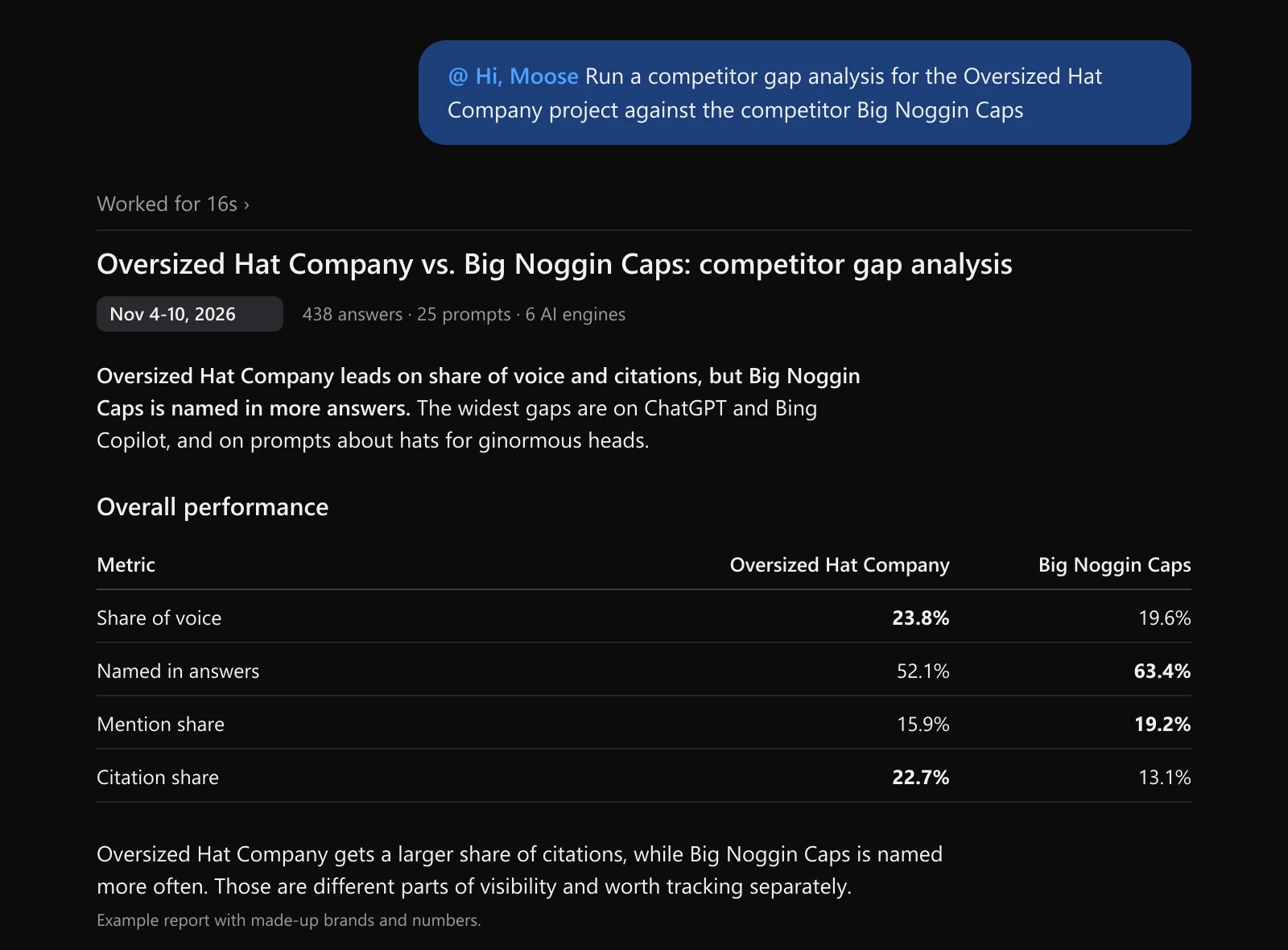
Before the numbers, look at the line under the title. It tells you the dates and how many answers, prompts and engines are behind the report. The example covers 438 answers. With only 20 answers behind a report, I would wait for more runs before acting on it.
The four numbers in the table measure different things.
| Metric | What it measures |
|---|---|
| Share of voice | Each brand's weighted slice of all the brand mentions in the answers. Being named first counts for more than being named sixth, and an answer that cites the brand's own site counts for more again. |
| Named in answers | The percentage of answers that mention the brand at all. |
| Mention share | The brand's share of all brand mentions, with no weighting. |
| Citation share | The brand's share of the links the engines cite. |
In the example, Oversized Hat Company leads on share of voice and citation share, while Big Noggin Caps is named in more answers. Both can be true at once. Big Noggin Caps appears in more answers, but Oversized Hat Company tends to be named higher up when it does appear, and the engines link to its site more often.
If I were working on Oversized Hat Company, I'd read that as two separate jobs. One is getting named in the answers where only Big Noggin Caps shows up. The other is keeping the citations it already has.
Share of voice by AI answer engine
The report also breaks share of voice out by engine.
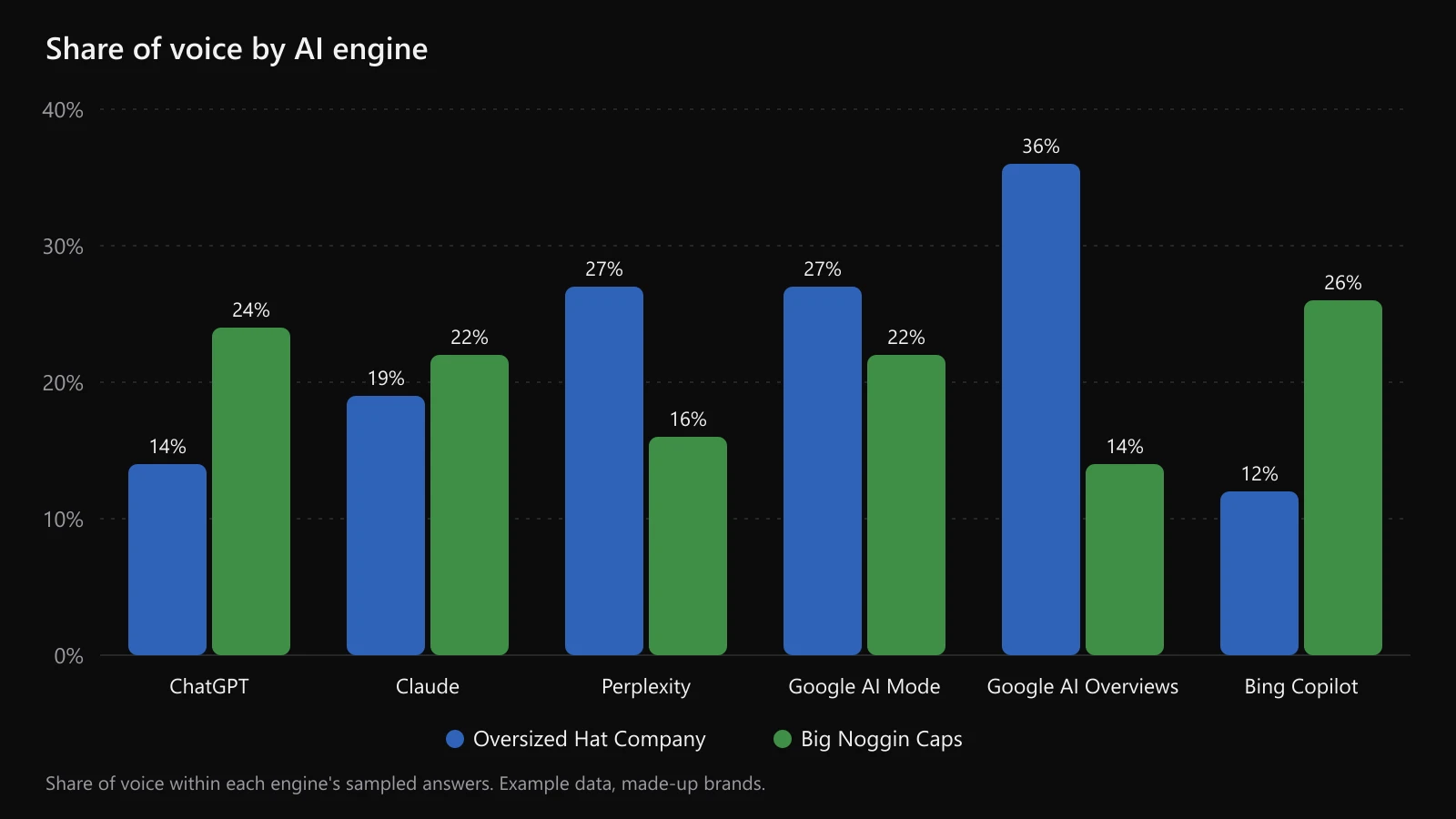
Oversized Hat Company is ahead on Perplexity and both Google surfaces. Big Noggin Caps is ahead on ChatGPT, Claude and Bing Copilot, and the widest gaps are on ChatGPT and Bing Copilot.
An overall number would hide that. Oversized Hat Company leads in total and still trails on three of the six engines.
The report gives the by-engine numbers as a table. If you'd like a chart, ask for one:
Chart share of voice by AI engine for both brands.
Claude and ChatGPT will draw it from the numbers already in the report.
Topics and sources
Below the engine breakdown, the report lists the topics where the competitor is named more than you, and the sources the engines cite in answers that name the competitor and not you.
I'd spend the most time on the sources. They show you which pages the engines are reading when they recommend the other company. Some will be the competitor's own pages. Others will be third-party reviews, affiliate content, comparison articles or forum threads that mention them and don't mention you. Tip: If you notice your visibility struggling on a specific AI engine but also notice non-competitor domains (like review sites or affiliates) that have high visibility on those engines, then those are potentially good opportunities to engage with to help your brand target those specific engines IF those review sites/affiliates are willing to add coverage for your brand. To be clear, often these types of opportunities are paid-to-play, so do be careful - consider checking the domain on a legacy SEO tool like Ahrefs to get a sense of how long the domain has been around for and an estimate of their traffic details.
Step 4: Work through the action items
As mentioned, the report ends with a prioritized list of action items. Each one has a priority, the action, the reason with its evidence, a type, the topic, and the engines and sources involved.
There are four types: create a page, improve a page, get mentioned, and protect.
Here is what a few rows could look like for the Oversized Hat Company example.
| Priority | Action | Why | Type | Engines |
|---|---|---|---|---|
| High | Create a page on hats for ginormous heads | Big Noggin Caps is named in 21 of 24 answers on ginormous-head prompts and Oversized Hat Company in 6. No Oversized Hat Company page covers the topic. | Create a page | ChatGPT, Bing Copilot |
| High | Rework the size chart page so the measurements are written out in text | Big Noggin Caps' size chart is cited in 14 answers. Oversized Hat Company's is cited in 2. | Improve a page | ChatGPT, Claude |
| Medium | Ask to be added to a third-party roundup of hats for big heads | The roundup is cited in 11 answers that name Big Noggin Caps and not Oversized Hat Company. | Get mentioned | Perplexity, Google AI Mode |
| Low | Keep the hat care guide current | Oversized Hat Company's guide is cited in 17 of 20 answers on hat care prompts. | Protect | Google AI Overviews |
Where Hi, Moose has a tool for the work, the action items will name an available tool to use and your AI chat should offer to start it.
So from the same chat you can go from the gap to the work:
Start the content brief for the first action item.
The report also ends with a link that opens the same report in Hi, Moose, where you can export the action items to Excel or CSV for your team.
Useful follow-up questions
Once the report is in the chat, you can keep asking about it. A few I'd try:
Show me the full ChatGPT answer for one of the ginormous-head prompts where Big Noggin Caps was named and we weren't.
Which third-party pages are cited most in answers that name Big Noggin Caps and not us?
Run the same gap analysis for the previous 7 days and tell me what changed.
Reading a few of the original answers is worth the time, because they show how the engine describes each company.
What to keep in mind about the numbers
A gap analysis covers your tracked prompts, on your tracked engines, on the days your runs happened. It is not a measurement of all of AI search. If your prompt list leans toward one product category, the report will too.
AI answers also vary from run to run. I'd treat a gap that shows up on several prompts across several days as real, and I'd wait for more data on a gap that comes from only a handful of answers.
Comparing one competitor at a time keeps the report more readable. If you track five competitors, run it for the one you view as your main competitor first.
Get your first AI visibility gap analysis
If you already track AI search visibility in Hi, Moose, add the connector to Claude or ChatGPT, ask how you compare with one competitor, and start with the high-priority action items.
If you're new to this, download Hi, Moose and set up tracking first. The AI visibility dashboard walkthrough covers the prompts and the daily schedule, and the Hi, Moose MCP page lists everything else the connector can do.
FAQs
What is an AI search visibility gap analysis?
An AI search visibility gap analysis compares how often AI search engines such as ChatGPT, Claude, Perplexity, Google AI Overviews, Google AI Mode, Gemini, Grok and Bing Copilot name and cite your brand against one competitor, for the same set of prompts over the same period. It shows where the competitor is ahead, by engine and by topic, which sources the engines cite when they name the competitor and leave you out, and what to work on to close the gap.
Can I run a competitor gap analysis in ChatGPT or Claude?
Yes. Add the Hi, Moose MCP connector (https://mcp.himoose.com/mcp) to Claude or ChatGPT, sign in with your Hi, Moose account, and ask how you compare with a tracked competitor in AI search. The report comes back in the chat with the numbers for both brands and a prioritized list of action items. ChatGPT supports custom MCP connectors on its paid plans.
Do I have to use ChatGPT or Claude, or can I use another AI service like Grok?
Yes, you should be able to reliably use the tool from any AI chat client that supports MCPs.
Does the gap analysis run new AI searches?
No. The gap analysis reads the AI answers Hi, Moose has already collected for your tracked prompts during the period you pick. It never runs new checks, so keep your visibility schedule turned on in Hi, Moose to have recent answers to compare.
Is the Hi, Moose gap analysis free?
Visibility tracking is free in the Hi, Moose desktop app for one project. The competitor gap analysis report is part of paid plans, including paid plans where you bring your own OpenRouter key. On a free plan the connector tells you no report was built. Sorry! Maybe we can make a free version at some point. Model quality matters a lot here.
What is the difference between share of voice and named in answers?
Named in answers is the percentage of answers that mention the brand at all. Share of voice is the brand's weighted slice of all the brand mentions in those answers: a brand named first counts for more than a brand named sixth, and an answer that cites the brand's own site counts for more again. A competitor can be named in more answers and still have a lower share of voice if it tends to appear further down the list.
Which AI engines does the gap analysis cover?
It covers the engines your Hi, Moose project tracks. Hi, Moose can track ChatGPT, Claude, Perplexity, Gemini, Grok, Google AI Overviews, Google AI Mode and Bing Copilot, depending on your plan and settings. The report breaks share of voice out by engine so you can see where the competitor is ahead.
How much data do I need before running a gap analysis?
The report defaults to the last 7 days of stored answers. A week of daily runs across 25 or more prompts gives you a few hundred answers, which is enough to compare two brands by engine. Check the answer count at the top of the report before reading much into a small difference.

Runs SEO by day and built Hi, Moose by night. No investors, no big team, just practical tooling for the AEO problems he kept hitting. Named the company after his dog.