If someone asks ChatGPT to recommend a product like yours, does your company show up? What about Gemini, Perplexity, Grok, or Google's AI search results? And when they do mention you, where are they getting their information?
You can track all of this for free, every day, and have a dashboard that shows how your visibility changes over time.
I'm going to walk through setting one up with Hi, Moose, our free AEO desktop app, and an open-source AEO skill that lets you build a custom dashboard inside Claude or in your preferred AI client that supports skill files. No coding experience or API keys required.
I'll also show you how to use the data once you've collected it, including some examples from roughly 2,500 AI answers we collected during a two-week period in September.
If you'd rather vibe code your own dashboard from scratch, we'll cover that option, too.
What goes into an AI visibility dashboard?
A basic AI visibility dashboard tracks how often AI search or answer engines mention, cite, or recommend your business when someone asks a relevant question.
Think of it as an extension of traditional SEO reporting. Instead of tracking where a page ranks for a keyword on a SERP, you're looking at how your business appears in AI-generated answers.
I would start with five things:
- Brand mentions: How often does your business appear in answers to the questions you're tracking?
- Citations: Which pages on your website are being linked to, and how often?
- Competitors: Who else is being recommended for the same questions?
- Prompts: Which questions consistently include your company, and which are you left out?
- History: How do those results change over time?
You can get more sophisticated with recommendation position, sentiment, brand accuracy, and other measurements. But those five are enough to give a business a useful view of its AI search presence.
One thing I would keep separate from the beginning is branded versus non-branded prompts.
For example, asking ChatGPT "Is Hi, Moose a good AEO tool?" (of course it is 😉) will almost certainly result in a mention of Hi, Moose.
Asking "What's a good free tool to track my brand in AI search?" tells me considerably more about whether someone unfamiliar with Hi, Moose might discover it.
Both questions have value. Just don't combine them into one visibility percentage and assume it represents how often new customers encounter your brand.
Step 1: Choose the questions you want to track
I'd start with 30 to 40 prompts, and try to group them into categories. With 40 prompts, you could have four product categories with 10 prompts within each, enough to cover several different ways someone might discover your business for each category. The more unique prompts you have per category, the more realistic view you'll have of your AI search visibility for that category overall.
You don't need a massive list to start. A smaller group of relevant questions is a much better starting point than hundreds of prompts you haven't thought through. In fact, there are prompts that may be a waste of time and resources track, specifically those that do not return any kind of vendor mention or citation. Like in classic SEO, it's important to consider the users' search intent. Often commercial-intent aligned prompts do return vendor mentions and citations whereas informational-intent may not.
Let's say you sell accounting software for small businesses and you're primarily interested in commercial-intent prompts.
Your prompts might include:
- What's the best accounting software for a small business?
- How can I manage bookkeeping without hiring an accountant?
- QuickBooks alternatives for a one-person business
- What's the cheapest accounting software for freelancers?
- Which accounting tools integrate with Stripe?
- Is [your brand] a good choice for a small business?
I like grouping prompts by the problem someone is trying to solve, the product category they're researching, and the alternatives they're considering.
You can get ideas from customer emails, sales conversations, Reddit, and the questions people ask before buying your product.
Write these the way somebody would ask an AI assistant. They don't have to resemble traditional SEO keywords. They also do not always have to perfectly match what your customers' type, the idea is, you want to know how visible you are at the product category level.
Once you've settled on your initial list, keep those prompts consistent for a while. If you're changing the questions every week, it's hard to know whether your visibility changed or you simply started measuring something different.
You can add new prompts whenever you need to. Just preserve the existing ones so you have something to compare against.
Step 2: Set up free daily tracking within Hi, Moose
Hi, Moose is an AEO desktop application for Windows and Mac (also available in a web-based version). I built Hi, Moose to make AI search research, visibility tracking, and AEO work actionable and accessible without the cost and complexity of enterprise platforms.
There are a ton of other vendors offering AI search visibility products however, Hi, Moose is the only truly free option without limits and that is not dependent on connecting to APIs for the data.
The free plan lets you track one project, with unlimited prompts, across six AI search engines:
- ChatGPT
- Perplexity
- Gemini
- Grok
- Google AI Overviews
- Google AI Mode
The app collects answers from the consumer-facing experiences on your own computer. We call this local fetch.
Because you're using your computer to collect the answers, you aren't paying model API fees for every prompt.
Here's the setup.
Download the app and add your business
Start by downloading Hi, Moose. It's free for Windows and macOS, with no credit card required.
Once installed, create an account and add your website as a project.
Enter your company name and domain. Hi, Moose uses those details to recognize when an engine mentions your business or cites your website.
If you use different variations of your brand name, you can add those as aliases.
Add your prompts
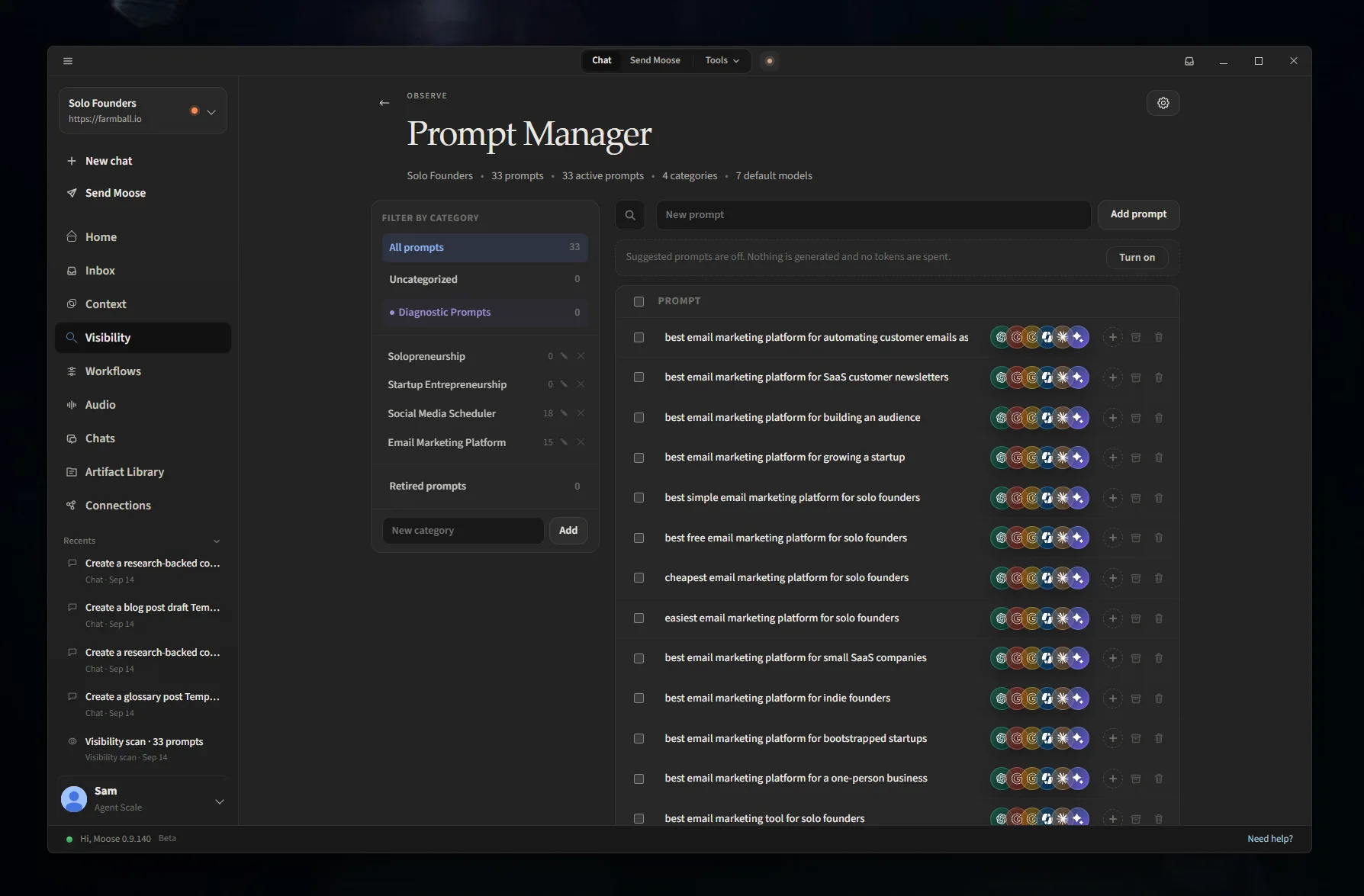
Open Visibility → Prompt Manager.
Add the questions you put together in the first step. As mentioned, you should organize them into categories.
For each prompt, select the AI engines you want to track.
I'd recommend using the same set of prompts across several engines. One of the more interesting things you'll discover is how differently the platforms respond to identical questions.
You can also add competitors under Visibility Settings. Start with two or three companies your customers would reasonably consider alongside yours.
Set the schedule to daily
Under Visibility → Settings, configure your tracking schedule.
You can choose daily, weekdays, weekly, or manual checks. For this setup, select daily.
You can also choose how many samples to collect per prompt. Starting with one each day is fine. If you want to investigate how frequently an answer changes, repeated samples can be useful.
There is one catch with free local tracking: your computer needs to be on, with Hi, Moose running, when the checks are scheduled.
You can leave the application minimized in your system tray. If you shut down your computer overnight, schedule the checks for a time when you're normally working.
(Side note: you can install the Hi, Moose app in the cloud as well using a VM, or Windows Server to keep it always-on.)
Run an initial check to make sure everything is collecting properly.
Once it finishes, you'll have your first set of results in the Visibility dashboard. From there, each scheduled run adds another set of answers to your history.
Step 3: Look at your first results
You'll see several views in Hi, Moose, including brand mentions, citations, competitor visibility, and changes over time.
Before getting too interested in the percentages, open a few of the actual answers.
I'd look at three things.
First, when your company is mentioned, how is it being described? Does the description match what you sell today?
Second, when your company isn't mentioned, what gets recommended instead? Are those companies similar to yours, or is the AI engine interpreting the question differently than you expected?
Third, where are the answers getting their information? Are they citing your website, independent reviews, G2, Reddit discussions, YouTube videos, or competitor pages?
You'll often find something worth investigating in the first batch of answers.
The daily collection becomes more valuable once you have a few weeks of history, because you can start separating recurring patterns from the natural variation between AI responses.
An example from our own visibility data
In September, I collected AI visibility data for 33 prompts about software commonly used by solo founders. The prompts covered email marketing platforms and social media scheduling tools.
The project ran across six AI systems daily, collecting roughly 2,500 usable answers over two weeks.
One of the categories covered 18 questions about social media schedulers.
Buffer appeared in 1,000 of the 1,332 answers for that category, giving it a 75% mention rate.
That's a strong showing. But the engine-level breakdown is much more useful.
| AI engine | Buffer mentioned | buffer.com cited |
|---|---|---|
| ChatGPT | 87% | 74% |
| Google AI Mode | 88% | 11% |
| Google AI Overviews | 85% | 1% |
| Bing Copilot | 84% | 5% |
| Claude | 14% | 5% |
Look at the difference between ChatGPT and Google AI Overviews.
Both mentioned Buffer in the vast majority of their answers. But ChatGPT frequently linked directly to buffer.com, while Google AI Overviews almost never did.
Google was citing other sources, including Reddit, YouTube, and Zapier.
If I were responsible for Buffer's visibility, I'd want to understand why Google was relying on those third-party sources so heavily, and what information those sources were providing.
That could lead to updated content on Buffer's website, correcting inaccurate information elsewhere, or identifying third-party publications worth engaging with.
We can also look at Metricool, which appeared in 751 answers, around 56% of the same dataset.
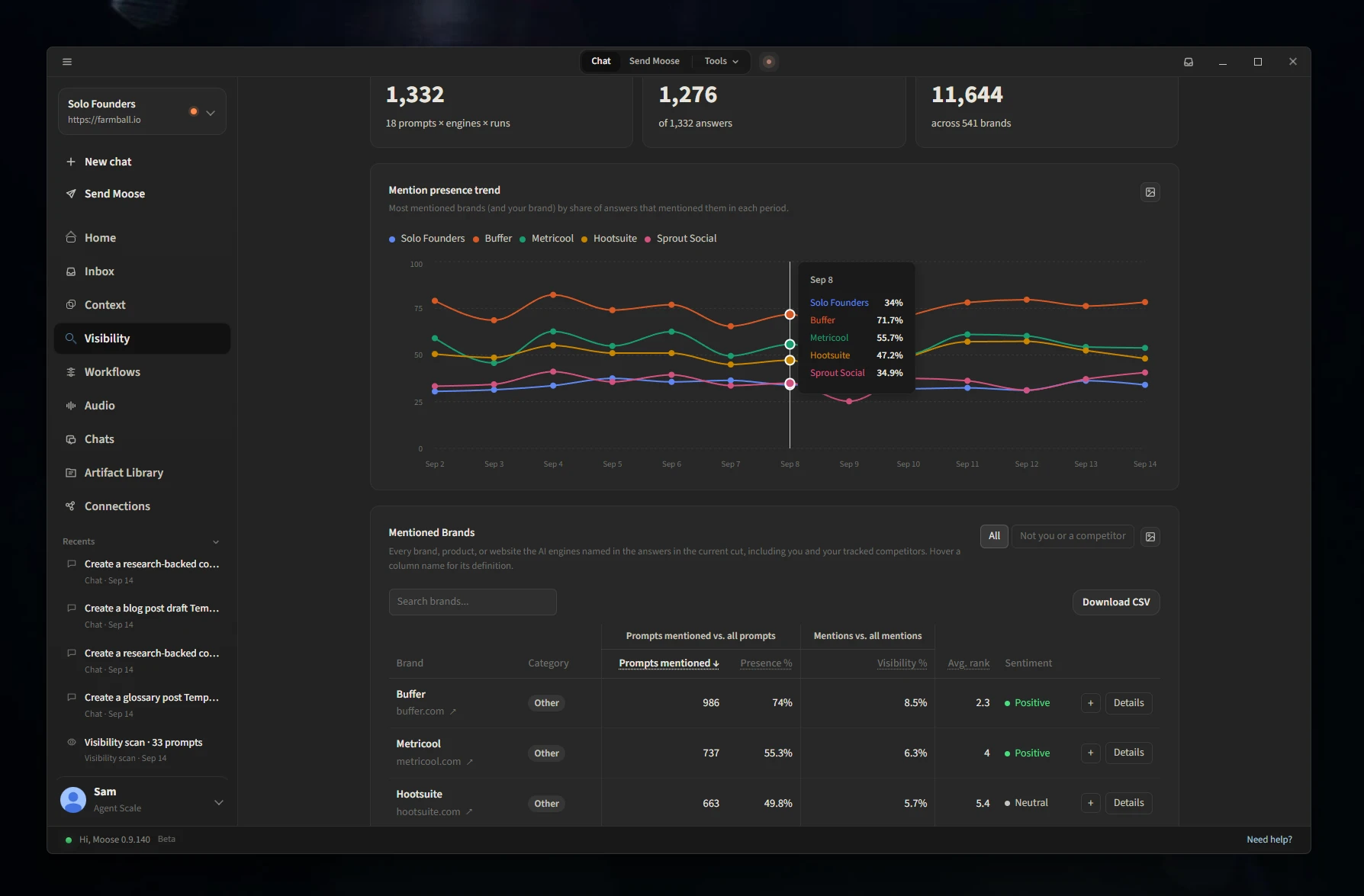
Metricool was mentioned first in 59 answers, compared with Buffer's 542.
If I were working on Metricool's AI visibility, I'd pull the prompts where Metricool was included but Buffer received the lead recommendation.
I'd want to understand how the engines were describing the two products and whether that changed when someone asked specifically about analytics, pricing, or ease of use.
This is the kind of analysis you can do with a relatively simple dashboard.
You have the overall numbers to identify where something is happening, and the original answers to help you understand what might be causing it.
One note about the September research: ChatGPT and Claude were measured through their APIs, while the Google and Bing results came from their consumer-facing products. An API response isn't necessarily identical to what someone sees in the corresponding chat application, they most often differ, so I keep those sources labeled separately.
Step 4: Build a custom dashboard with this free AEO skill
Hi, Moose already includes a Visibility dashboard, so you can stop there if it covers what you need.
But you might prefer a different layout, want to share a report with your team, or simply enjoy working inside Claude.
We've published a collection of free, open-source AEO skills on GitHub for that.
The ai-visibility skill connects to the visibility data you've already collected in Hi, Moose and builds an interactive HTML dashboard.
It can include a 7-, 30-, or 90-day view, comparisons with the previous period, filters by AI engine, competitor charts, cited sources, missing brand mentions, and a prioritized to-do list.
You can save the dashboard as an HTML file, export charts as PNGs, save numbers as CSV, or generate a PDF.
You don't have to design the dashboard or write any code yourself.
Connect Hi, Moose to Claude
First, you'll need to connect Claude to Hi, Moose using our MCP connector.
MCP is a way for an AI assistant to work with outside apps and their data. In this case, it allows Claude to read your Hi, Moose projects, stored visibility results, and opportunities.
Open Hi, Moose and go to Settings → Hi, Moose MCP.
Choose your computer as the host device for the project. This is the computer that will handle requests coming from Claude.
Then, in Claude:
- Open Settings → Connectors.
- Select Add custom connector.
- Enter
https://mcp.himoose.com/mcpas the server address. - Connect and sign in using your Hi, Moose account.
Once connected, start a new conversation and ask Claude to list your Hi, Moose projects.
If it returns your project, the connection is working.
We have full instructions for connecting Hi, Moose to Claude, ChatGPT, and other agents if you need them.
Install the AI visibility skill
Now open our AEO skills repository on GitHub.
Select Code → Download ZIP, then extract the downloaded folder.
Inside the repository, open the skills directory. You'll find a folder named ai-visibility.
Right-click on the folder and compress that individual folder into a ZIP file.
In Claude, open Customize → Skills, click the plus button, and choose Create skill → Upload a skill. Select the ZIP you just created.
Make sure Claude's code execution feature is enabled.
That's the setup.
Now you can open a new conversation with the Hi, Moose connector enabled and ask:
Build an AI visibility dashboard for my Hi, Moose project using the last 30 days of data. Show mentions and citations by engine, competitor share of voice, the most common cited sources, and what changed from the previous period.
Claude will use the skill and your stored Hi, Moose data to generate the dashboard.
You can also ask for something more specific, such as a report on one competitor or a list of prompts where your brand has never appeared.
The skill uses your existing results. It doesn't run new visibility checks on its own, so you'll still want to keep your daily schedule enabled in Hi, Moose.
The repository also includes weekly-content-plan and publish-ready-draft skills if you want to use your visibility opportunities to plan and produce content.
You can use the same skills with other compatible agents. Installation differs by application, and ChatGPT's native skills feature is available on supported workspace plans. The Hi, Moose MCP connector itself is available on paid ChatGPT plans.
Step 5: Give yourself a useful weekly report
With daily collection running, you should have new data accumulating automatically.
I wouldn't spend much time reviewing the dashboard every morning. I'd rather check it once a week, when there's enough data to make comparisons.
You can use the ai-visibility skill to ask Claude:
Review our AI visibility over the last seven days. Compare it with the previous week. Show where our competitors appeared and we didn't, which sources were cited most often, and the five most useful things we could work on next.
You can also ask for a plain-text report that you can email or share with someone else.
I'd focus the weekly review on a handful of questions.
Did our visibility change? Compare mention and citation rates by engine and topic. If a number has moved significantly, check how many responses are behind it and read a few of them.
Are competitors being recommended where we aren't? Find the relevant prompts and read the answers. You might discover an entire topic where your website doesn't have much useful information.
Which websites are influencing the answers? Pay attention to third-party sources. If the engines keep citing a particular guide or discussion, it's worth understanding what that source contributes.
Is the information about our company accurate? AI engines sometimes use outdated product descriptions or miss important features. You want to know when that happens.
What are we going to do about it? Choose one or two items worth addressing. You don't need to turn every change in the dashboard into a new task.
Hi, Moose also has an Opportunities section that identifies gaps from your tracked results. You can use that alongside the dashboard to decide where to spend your time.
I would keep notes on meaningful changes you make to your site, new content you publish, and other marketing work. Those dates can help when you're reviewing trends later.
One other thing: don't assume every change in visibility is the result of something you've done.
AI engines change their responses all the time. A few missing mentions across one day's results might mean very little. If the same pattern continues across multiple prompts and runs, it's worth investigating.
What about Google Analytics and Search Console?
I would keep your AI visibility dashboard alongside your regular website reporting.
GA4 can help you identify visits coming from AI platforms, while Google Search Console shows how your website performs in Google Search.
Google introduced a Search Generative AI performance report in 2026, which provides impression data for URLs appearing in Google's generative AI features.
These are somewhat useful measurements, but they don't answer the same questions as prompt tracking.
Someone might ask ChatGPT for the best product in your category, see your company recommended, and visit your website directly later that day.
Your analytics may never associate that visit with the earlier AI recommendation.
Likewise, being cited in an AI answer doesn't guarantee somebody will click the link.
I'd keep Direct traffic, referral traffic, Search Console performance, and AI visibility together when reviewing overall performance, while recognizing that each measures something different.
What if you want to vibe code your own dashboard?
You can also build a custom system with Claude Code, Cursor, Codex, or another coding agent.
You don't need to know how to write the application yourself. Give the agent a clear description of what you want to track, which AI engines to use, and how you want the results displayed.
For example:
Build a local AI search visibility dashboard for my business. I want to manage a list of prompts, run them daily against search-enabled AI APIs, store the full responses and citations, and see brand mentions, competitor comparisons, and historical trends. Keep results separated by engine, preserve the raw answers, and give me a simple interface to review the data.
You can work with the agent to choose the providers, connect API keys, and refine the dashboard as you go.
There are some tradeoffs though.
Using search-enabled APIs can incur usage costs, especially with a large prompt list and repeated daily sampling. You'll also need to maintain the connections as providers update their models and APIs.
And an API-based dashboard won't give you equivalent access to every consumer AI search feature. Google AI Overviews, for example, isn't something you can measure simply by calling the Gemini API.
This is one reason we built local collection into Hi, Moose.
If you're primarily interested in a custom dashboard, you can also have your coding agent use the Hi, Moose MCP connector or REST API to retrieve your existing data. That gives you room to experiment with the presentation without building and maintaining your own collection system.
Our Build with Moose documentation covers using the connector with Claude Code, Cursor, Codex, and other agents.
A few things I'd get right from the beginning
After you've had a dashboard running for a while, the quality of the underlying data becomes more important than how the charts look.
I'd make sure of a few things.
Keep the original answers. If your citation rate drops, you should be able to open the relevant responses and see what changed.
Keep AI engines separate. As the Buffer example showed, two engines can mention the same brand equally often and cite its website at very different rates.
Show the sample size behind percentages. A 50% mention rate based on two answers tells you very little. The same percentage based on hundreds of answers is considerably more useful.
Keep your prompts consistent. If you change the wording, preserve the earlier results and treat the new wording as a different prompt.
And make sure missing or unavailable responses don't get counted as answers where your company was absent. A failed collection can otherwise make your visibility appear to decline when nothing changed.
You don't need to make this complicated. You just need to be able to trust the numbers when you come back to them a month later.
Get it running, then let the history build
If you're starting from zero, I'd keep the first setup pretty modest.
Choose 30 to 40 questions, track them across a few AI engines, and schedule daily checks.
The free Hi, Moose desktop app will collect and store the answers on your computer. You can use the built-in dashboard or install our free AEO visibility skill to create a custom dashboard inside Claude.
Once you've collected a couple of weeks of answers, start looking at which brands are consistently recommended, where your own site gets cited, and which sources the engines tend to rely on.
You'll have a record you can return to every week, without needing an enterprise platform or a monthly tracking bill.
And, more importantly, you'll have the individual answers behind the numbers when you want to figure out what to work on next.
FAQs
What is an AI visibility dashboard?
An AI visibility dashboard tracks how often AI search and answer engines such as ChatGPT, Gemini, Perplexity and Google AI Overviews mention, cite or recommend your business when someone asks a relevant question. A basic one covers five things: brand mentions, citations of your pages, the competitors recommended for the same questions, which prompts include you and which leave you out, and how those results change over time.
How can I track my brand in ChatGPT, Grok, Gemini and Google AI Overviews for free?
The free plan of the Hi, Moose desktop app tracks one project with unlimited prompts across ChatGPT, Perplexity, Gemini, Grok, Google AI Overviews and Google AI Mode. It collects the answers from the consumer-facing products on your own computer, so there are no API fees. Your computer needs to be on with Hi, Moose running when the daily check is scheduled.
How many prompts do I need to track AI search visibility?
30 to 40 prompts grouped into categories is a good start, for example four product categories with 10 prompts each. Write them the way someone would ask an AI assistant, favor commercial-intent questions that return vendor mentions and citations, and keep the list consistent so results are comparable from week to week. Add new prompts when you need to, but keep the existing ones.
Why is my brand mentioned in AI answers but my website is not cited?
Engines often name a brand while linking to third-party sources instead of the brand's own site. In our September data, Buffer was mentioned in 85% of Google AI Overviews answers about social media schedulers but buffer.com was cited in 1%, with Reddit, YouTube and Zapier cited instead. Open the cited sources for those prompts to see what the engines are relying on and whether that information is accurate.
Is an API response the same as what people see in the ChatGPT or Gemini app?
No. An API response is not necessarily identical to what someone sees in the consumer AI chat product, and the two most often differ. Some features, such as Google AI Overviews, cannot be measured through an (official) API at all. Keep API-based results labeled separately from answers collected from the consumer products.
Can I build an AI visibility dashboard inside Claude?
Yes. Connect Hi, Moose to Claude with the Hi, Moose MCP connector, then install the open-source ai-visibility skill from the aeo-skills repository on GitHub. Ask Claude for a dashboard and it builds an interactive HTML page from the visibility data Hi, Moose has already collected, with engine filters, competitor charts, cited sources and a to-do list. The skill does not run new checks, so keep the daily schedule on in Hi, Moose.
Does Google Analytics or Search Console show AI visibility?
Only part of it. GA4 shows visits that arrive from AI platforms, and Search Console's Search Generative AI report shows impressions for URLs that appear in Google's generative AI features. Neither records whether an engine recommended you in an answer nobody clicked, so keep them alongside prompt tracking.
How often should I review an AI visibility dashboard?
Collect daily and review weekly, once there is enough data to compare one week with the one before. Check whether mention and citation rates changed by engine and topic, where competitors appeared and you did not, which sources were cited most, and whether the engines describe your company accurately. One day of missing mentions usually means very little; a pattern that holds across several prompts and runs is worth investigating.

Runs SEO by day and built Hi, Moose by night. No investors, no big team, just practical tooling for the AEO problems he kept hitting. Named the company after his dog.